Part 4 of a 4-part series on Call Intelligence. Part 1 covers the whole pipeline. This part builds on the structured summaries from Part 2.
The scale is real: about 300 million calls a year. Every example, keyword, number and dashboard screen below is mock data created for illustration.
From “why” to “about what”
Knowing a member called about the status of a denied claim is useful. Knowing the denied claim was for a cardiologist visit is actionable.
Topics (Part 3) tell you why someone called. Named entities add the next level of detail: the specific benefits, specialists, procedures and diseases mentioned in the conversation.
Notice that “office visit” appears twice. As a benefit it maps to a place-of-service category. As a procedure it maps to Physician visit. The same words mean different things depending on the entity type, and the design has to allow for that.
The surprising design choice: no LLM
The summary model is an LLM. The topic model is trained on LLM-generated labels. The entity model uses no LLM at all.
It’s a dictionary-based extractor: curated keyword tables, exact matching and a longest-match rule. At about 820,000 summaries a day, that choice matters:
| Concern | LLM extraction | Dictionary extraction |
|---|---|---|
| Output consistency | The same concept can come back as “PT”, “physio” or “physical therapy” | Every keyword maps to one fixed class |
| Fixed categories | Must be enforced and validated | Built in: the class is the mapping |
| Explainability | Hard to say why something was extracted | Every match traces to one row in a table |
| Cost at scale | Another ~820K LLM requests a day | A regex pass over text we already have |
| Fixing errors | Rewrite and re-test the prompt | Add or edit a row in the table |
| Recall on new phrasing | Strong | Only as good as the keyword list |
The trade-off is clear. You give up some recall on unusual wording and gain consistent, explainable, cheap output. When a dashboard counts entities across hundreds of millions of calls, consistency matters most: a class that drifts from week to week makes every trend line wrong.
The heavy lifting is already done upstream. The LLM summary (Part 2) cleans up transcription errors and writes in plain, consistent language. That makes simple matching work far better than it would on raw transcripts.
How it works
The code below is simplified from production, but the shape is the same.
1. Mapping tables: the real model
There’s one keyword table per entity type. Each row maps a keyword to a class:
| kw | kw_lemmatized | category |
|---|---|---|
| chemo treatment | chemo treatment | Infusion therapy |
| oxygen concentrator | oxygen concentrator | DME |
| home oxygen | home oxygen | DME |
| hearing test | hearing test | Hearing |
| test for hearing | test hearing | Hearing |
Illustrative extract of a benefit mapping table.
The lemmatized column normalizes word forms, so “test for hearing” and “hearing tests” can land on the same class. These tables are where the domain knowledge lives. Improving the model mostly means improving them.
Loading them is one query per entity type:
from google.cloud import bigquery

bq = bigquery.Client()
ENTITY_TYPES = ["benefit", "specialist", "procedure", "disease"]

def load_mapping(entity_type: str) -> dict[str, str]:
    """Return {keyword: class}, using both the raw and lemmatized keyword."""
    rows = bq.query(f"""
        SELECT LOWER(kw) AS kw, LOWER(kw_lemmatized) AS kw_lem, category
        FROM contact_intel.entity_map_{entity_type}      -- mock table name
    """).result()
    mapping = {}
    for r in rows:
        mapping[r.kw] = r.category
        mapping[r.kw_lem] = r.category
    return mapping
2. Expand keyword variants
Before matching, each keyword is expanded into singular and plural variants. That way “panel” also matches “panels”, and nobody has to list both forms by hand:
def plural(word: str) -> str:
    if word.endswith("y") and word[-2:-1] not in "aeiou":
        return word[:-1] + "ies"                 # therapy -> therapies
    if word.endswith(("s", "x", "ch", "sh")):
        return word + "es"                       # rash -> rashes
    return word + "s"                            # panel -> panels

def expand(mapping: dict[str, str]) -> dict[str, str]:
    """Add singular/plural variants. Pluralize the last word only:
    'obstetric panel' -> 'obstetric panels'."""
    out = dict(mapping)
    for kw, cls in mapping.items():
        *head, last = kw.split()
        out.setdefault(" ".join(head + [plural(last)]), cls)
        if last.endswith("ies"):
            out.setdefault(" ".join(head + [last[:-3] + "y"]), cls)
        elif last.endswith("s") and not last.endswith("ss"):
            out.setdefault(" ".join(head + [last[:-1]]), cls)
    return out
Simplified. Production also handles irregular plurals and lemmatizes the summary text.
3. Exact match, longest span first
For each summary:
- Find every exact match from the expanded keyword set, including overlapping ones.
- Rank matches by length, longest first.
- Assign matches one at a time. Once a span of text is claimed, shorter keywords inside it are skipped.
- Attach the class from the mapping table.
Without step 2, “two obstetric panels” would produce two entities: a maternity procedure and a generic laboratory study. That’s wrong, and it inflates counts. Longest-match-first is a small rule with a big effect on precision.
Looping over thousands of keywords for every summary is too slow at this volume. Instead, each entity type gets one compiled pattern. The keywords go into a single alternation, longest first, inside a lookahead, so one scan of the text finds every candidate, including overlapping ones:
import re
from dataclasses import dataclass

@dataclass
class Matcher:
    entity_type: str
    mapping: dict[str, str]          # expanded {keyword: class}
    pattern: re.Pattern

def build_matcher(entity_type: str) -> Matcher:
    mapping = expand(load_mapping(entity_type))
    alts = "|".join(re.escape(k) for k in sorted(mapping, key=len, reverse=True))
    # (?=...) lets matches overlap; longest-first alternation picks the
    # longest keyword that starts at each position.
    pattern = re.compile(rf"(?=\b({alts})\b)", re.IGNORECASE)
    return Matcher(entity_type, mapping, pattern)

def extract(text: str, m: Matcher) -> list[dict]:
    candidates = [(hit.start(1), hit.end(1)) for hit in m.pattern.finditer(text)]
    candidates.sort(key=lambda span: span[0] - span[1])       # longest first

    claimed = [False] * len(text)
    found = []
    for start, end in candidates:
        if any(claimed[start:end]):
            continue                                          # inside a longer match
        claimed[start:end] = [True] * (end - start)
        value = text[start:end]
        found.append({"entity_type": m.entity_type,
                      "value": value.lower(),
                      "class": m.mapping[value.lower()]})
    return found
procedures = build_matcher("procedure")
extract("The member went to get two obstetric panels.", procedures)
# -> [{'entity_type': 'procedure', 'value': 'obstetric panels',
#      'class': 'Maternity procedures'}]
The same extractor runs once per entity type, each with its own mapping table. That’s how “office visit” can be both a benefit and a procedure.
4. Run over a day of summaries
The job reads the concise summary and the call intents for one call_date, runs all four matchers, and overwrites that day’s partition, so a rerun never duplicates rows:
def run_entities(run_date: str) -> None:
    matchers = [build_matcher(t) for t in ENTITY_TYPES]       # compile once per run

    summaries = bq.query("""
        SELECT call_id, call_date, concise_summary, intents   -- intents: ARRAY<STRING>
        FROM contact_intel.call_summary_parsed
        WHERE call_date = @run_date
    """, job_config=params(run_date)).result()

    rows = []
    for s in summaries:
        for text in [s.concise_summary, *s.intents]:
            for m in matchers:
                for e in extract(text, m):
                    rows.append({"call_id": s.call_id, "call_date": str(s.call_date),
                                 "run_date": run_date, **e})

    partition = run_date.replace("-", "")
    bq.load_table_from_json(
        rows, f"contact_intel.call_entity${partition}",
        job_config=bigquery.LoadJobConfig(write_disposition="WRITE_TRUNCATE"),
    ).result()
Simplified. This is plain regex matching: no model, no GPU and no API calls. It runs on ordinary CPU workers on the same Dataproc cluster as the other inference jobs.
Each section of the summary is scanned separately, so a match can’t run across two sections. The same keyword can still match more than once per call: in the concise summary, then again in an intent. That’s why every query below counts distinct calls.
Output tables
Each entity type writes to its own table, and a combined table stacks all four with an entity_type column:
| Column | Type | Description |
|---|---|---|
call_id |
STRING | Unique identifier for the call |
call_date |
DATE | Date the call occurred |
entity_type |
STRING | benefit, specialist, procedure, or disease (combined table only) |
class |
STRING | Standard category from the mapping table |
value |
STRING | The text as it appeared in the summary |
run_date |
DATE | Date the model ran |
Keeping both value and class is deliberate:
- class powers dashboards: a short, stable list you can count and trend.
- value powers drill-downs and debugging: what people actually said.
CREATE TABLE contact_intel.call_entity (
  call_id     STRING,
  call_date   DATE,
  entity_type STRING,   -- benefit | specialist | procedure | disease
  class       STRING,
  value       STRING,
  run_date    DATE
)
PARTITION BY call_date
CLUSTER BY entity_type, class, call_id;
Clustering by entity_type and class first matches how the dashboard filters, so a query for one class reads only the blocks that hold it.
Querying entities
All entities for one call:
SELECT entity_type, class, value
FROM contact_intel.call_entity
WHERE call_date = @call_date
  AND call_id   = @call_id
ORDER BY entity_type, class;
All calls that mention a class (for example, any dental benefit):
SELECT DISTINCT call_id
FROM contact_intel.call_entity
WHERE call_date BETWEEN @start AND @end
  AND entity_type = 'benefit'
  AND class = 'Dental';
All calls that mention a specific value (for example, “sealants”):
SELECT DISTINCT call_id
FROM contact_intel.call_entity
WHERE call_date BETWEEN @start AND @end
  AND entity_type = 'benefit'
  AND value = 'sealants';
Top classes with the values behind them, counting each call once. This is what the Named Entities view runs:
SELECT
  class,
  COUNT(DISTINCT call_id)                                     AS calls,
  ARRAY_AGG(DISTINCT value ORDER BY value LIMIT 5)            AS sample_values
FROM contact_intel.call_entity
WHERE call_date BETWEEN @start AND @end
  AND entity_type = 'procedure'
GROUP BY class
HAVING COUNT(DISTINCT call_id) >= @min_calls   -- hide very rare classes (privacy)
ORDER BY calls DESC;
Use COUNT(DISTINCT call_id) for “how many calls,” not COUNT(*). Keywords repeat within a summary.
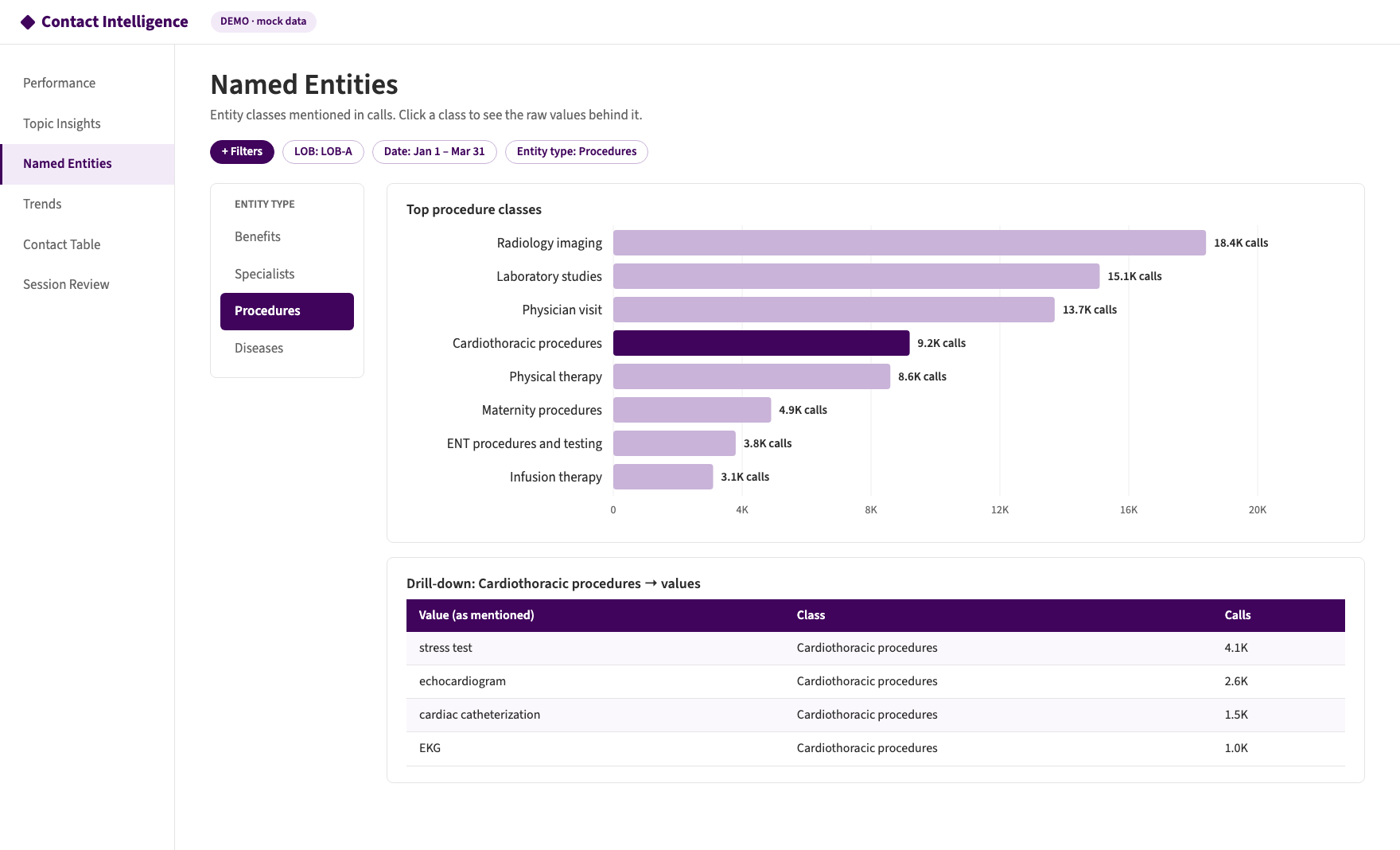 Figure 4: Dashboard view of procedure classes, with drill-down to the raw values behind a class (mock data).
How we measure quality
Entities are evaluated against a hand-labeled set of a few hundred summaries.
- Label every (value, class) pair that should be extracted, for all four entity types.
- Compare with the model’s output to count true positives, false positives and false negatives.
- Compute precision, recall and F1.
| Metric | Question |
|---|---|
| Precision | Of the (value, class) pairs extracted, how many are correct? |
| Recall | Of the pairs that should have been found, how many were? |
| F1 | Balance of the two |
We report each metric two ways, because they answer different questions:
- Micro average: pool every entity together. This tells you how well the system performs overall, and it’s dominated by the most common classes.
- Macro average: compute the metric for each class, then average them equally. This shows whether the system struggles with specific classes, such as rare procedures that are drowned out in the micro number.
from collections import Counter

def evaluate(gold: dict[str, set], pred: dict[str, set]) -> dict:
    """gold/pred: {call_id: {(value, class), ...}} for one entity type."""
    tp, fp, fn = Counter(), Counter(), Counter()
    for call_id in gold.keys() | pred.keys():
        g, p = gold.get(call_id, set()), pred.get(call_id, set())
        for _, cls in g & p: tp[cls] += 1
        for _, cls in p - g: fp[cls] += 1
        for _, cls in g - p: fn[cls] += 1

    def prf(t, f_p, f_n):
        precision = t / (t + f_p) if t + f_p else 0.0
        recall    = t / (t + f_n) if t + f_n else 0.0
        f1 = 2 * precision * recall / (precision + recall) if precision + recall else 0.0
        return precision, recall, f1

    micro = prf(sum(tp.values()), sum(fp.values()), sum(fn.values()))
    per_class = {c: prf(tp[c], fp[c], fn[c]) for c in tp | fp | fn}
    macro = tuple(sum(m[i] for m in per_class.values()) / len(per_class) for i in range(3))
    return {"micro": micro, "macro": macro, "per_class": per_class}
When macro recall is noticeably lower than micro recall, the cause is usually rare classes with thin keyword coverage. The fix is to add keywords, not to change the algorithm. The per_class scores show exactly which ones.
A pattern that showed up in our evaluation: diseases were the hardest entity type. Callers describe symptoms (“chest pain”) more often than diagnoses, and disease vocabulary varies a lot. Specialists were the easiest: there are only so many ways to say “cardiologist.”
What errors look like
Reviewing individual misses is where the improvements come from:
- False negative: a misspelling the summary model passed through (for example, a garbled form of “echocardiogram”) doesn’t match any keyword. Fix: add the common variant, or tighten the summary prompt’s “no transcription errors” rule.
- False positive: a generic word like “disease” matches a broad catch-all class. Fix: remove or restrict overly generic keywords.
Both fixes are a table edit, with no retraining or prompt rewrite. The next daily run picks them up.
Where entities pay off
Entities are most useful combined with topics, which is easy because both live in the same consolidated table (Part 1):
- Which procedures drive the most prior-authorization calls? Those are candidates for clearer pre-service guidance.
- Which specialist types come up most in “find a provider” calls? These point to network or search-tool gaps.
- Which benefits cause the most coverage questions? These point to plan documents that need clearer wording.
SELECT ent.class AS procedure_class, COUNT(DISTINCT call_id) AS calls
FROM contact_intel.call_intelligence_dashboard,
     UNNEST(topics)   AS t,
     UNNEST(entities) AS ent
WHERE call_date BETWEEN @start AND @end
  AND t.topic_group = 'Prior authorization'     -- mock topic group
  AND ent.entity_type = 'procedure'
GROUP BY procedure_class
ORDER BY calls DESC
LIMIT 10;
Privacy note
Disease and procedure entities are sensitive health information. Treat entity tables with the same controls as transcripts and summaries: restrict access by role, report aggregates rather than individuals, and apply minimum-count thresholds (like @min_calls above) before showing rare values on a dashboard.
Lessons learned
- Not every step needs an LLM. Use the LLM where language is messy (summaries), a trained classifier for high-volume topics, and deterministic rules where consistency matters (entities).
- The mapping table is the model. Invest in keyword coverage and clear classes.
- Longest match first. It prevents double counting and protects precision.
- Compile once, scan once. One pattern per entity type keeps a day’s run fast without any GPU or API calls.
- Keep value and class. Class for dashboards, value for drill-down and debugging.
- Report micro and macro. Micro shows overall health; macro exposes weak classes.
- Count distinct calls. Keywords repeat within a summary.
- Make fixes cheap. When an error is a table edit, the model gets better every week.
Series wrap-up
Across the four parts, one pattern repeats: turn unstructured conversation into constrained, structured data, one layer at a time, and pick the simplest tool that works for each layer.
- Transcripts → structured summaries: an LLM, because conversations are messy (Part 2).
- Summaries → topics: an LLM labels training data, and a fine-tuned XLNet model classifies every call (Part 3).
- Summaries → entities: a dictionary, because consistency beats flexibility here (this part).
- Everything → one consolidated, partitioned table: fast, consistent dashboards over 300 million calls a year (Part 1).