Part 1 of a 4-part series on Call Intelligence: turning every customer conversation into structured, measurable data.
The scale is real: about 300 million calls a year. Every example call, metric, label and dashboard screen below is mock data created for illustration.
The problem
A contact center that takes 300 million calls a year records every one of them. That’s about 820,000 calls a day, or roughly 10 every second around the clock. Almost everything said on those calls stays locked in transcripts.
Operational data tells you how many people called and how long the calls took. It doesn’t tell you why they called, what they talked about, or whether the issue was resolved. The usual ways of filling that gap don’t scale:
- Disposition codes that agents pick by hand are slow, inconsistent and too broad.
- Keyword rules on raw transcripts break on transcription errors and varied phrasing.
- Manual QA sampling reads only a tiny fraction of calls, so it can’t measure trends or rank causes.
We wanted to read every call, turn it into structured data keyed by call_id, join it with the operational data we already had, and put it all in one table a dashboard can query quickly.
What “actionable” looks like
Before the pipeline, here is the kind of answer it exists to produce. Every call reason gets the same set of measures, so the expensive, unresolved ones stand out:
| Call reason (topic) | Share of calls | Avg. handle time | Resolved | Likely fix |
|---|---|---|---|---|
| Ask why a claim was denied | 9.8% | 11:40 | 61% | Show the denial reason in the member portal |
| Check prescription coverage | 7.2% | 8:05 | 78% | Better coverage lookup in the app |
| Confirm a provider is in-network | 6.5% | 6:30 | 88% | Promote the provider search tool |
| Request a new ID card | 4.1% | 4:10 | 95% | Fully automate in the phone menu |
Mock data.
Each row is a decision someone can act on: a self-service feature, an agent training topic or a process fix. The rest of this post shows how we get from raw audio to that table.
The key idea: summarize first
Raw transcripts are long and noisy: greetings, identity checks, hold time, transcription errors. At 820,000 calls a day, every model that reads the raw transcript pays for that noise again.
So the pipeline is built around one decision: an LLM turns each transcript into a short, structured summary first, and the other models read the summary instead of the transcript.
We also didn’t use an LLM for every step. Each layer uses the simplest tool that does the job well:
| Layer | Technique | Why |
|---|---|---|
| Structured summary | LLM with a response schema | Conversations are messy; this is where language understanding pays off |
| Call topics | XLNet fine-tuned on LLM-labeled data | High volume; the same input always gets the same output |
| Named entities | Keyword dictionary, longest match wins | Fixed categories; explainable and cheap |
| Resolution | LLM prompt on the transcript | Needs judgment about how the conversation ended |
| Operational metrics | SQL | Already structured |
That keeps it to two LLM calls per call (summary and resolution), about 1.6 million requests a day. Topics and entities run on the short summaries with much cheaper methods.
Architecture
There are three layers:
- Ingestion: transcripts land in Cloud Storage and are loaded into BigQuery.
- Enrichment: the summary, resolution and metrics jobs read the transcripts. The topic and entity jobs read the summaries.
- Consolidation: a final job waits for every upstream job, then writes one partitioned, clustered table for the dashboard.
Where each step runs
The inference jobs run on a Dataproc cluster. Only the topic model needs GPUs:
| Step | Runs on | How |
|---|---|---|
| Summaries | Dataproc workers (CPU) | Gemini API calls; multiprocessing over chunks of rows, one call per transcript |
| Call topics | Dataproc, 4 × NVIDIA L4 GPUs | Fine-tuned XLNet, batched inference split across the four GPUs |
| Named entities | Dataproc workers (CPU) | Regex matching against keyword tables; no model at all |
Everything runs as a daily batch, one call_date at a time. Transcripts need to be complete before the AI jobs start, so AI fields land a few days after the call. That’s fine for trend analysis, and we tell dashboard users so.
The code below is simplified from production, but the shape is the same.
Step 1: Land the transcripts
The transcription platform exports transcript files into a dated folder in Cloud Storage. A load job writes each day into its own partition of call_transcript:
from google.cloud import bigquery

bq = bigquery.Client()

def load_transcripts(run_date: str) -> None:
    """Load one day of transcript files into its own partition."""
    partition = run_date.replace("-", "")                 # 2026-03-12 -> 20260312
    job = bq.load_table_from_uri(
        f"gs://{BUCKET}/transcripts/dt={run_date}/*.json",
        f"contact_intel.call_transcript${partition}",
        job_config=bigquery.LoadJobConfig(
            source_format=bigquery.SourceFormat.NEWLINE_DELIMITED_JSON,
            write_disposition="WRITE_TRUNCATE",            # rerun = replace the day
        ),
    )
    job.result()
Writing to a single partition with WRITE_TRUNCATE means a rerun replaces that day instead of duplicating it. Every job in the pipeline follows the same rule.
Each row is one turn of the conversation (call_id, speaker, turn_seq, utterance_text), and everything downstream is keyed on call_id.
Step 2: Structured summaries (LLM)
First, the turns are stitched back into one transcript per call:
SELECT
  call_id,
  STRING_AGG(CONCAT(speaker, ': ', utterance_text), '\n' ORDER BY turn_seq) AS transcript
FROM contact_intel.call_transcript
WHERE call_date = @run_date
GROUP BY call_id;
Then the Gemini API (a fast, low-cost Flash–class model) returns a structured JSON summary for each call. A response schema passed to the API guarantees the shape, so every call produces the same fields.
This step needs no GPU: the work is API calls. The day’s transcripts are split into chunks of rows, and a pool of worker processes works through them row by row, one Gemini call per transcript:
from multiprocessing import Pool

def summarize_chunk(chunk: list[dict]) -> list[dict]:
    """Runs in its own process: one Gemini call per transcript, row by row."""
    return [{"call_id": c["call_id"], "call_date": c["call_date"],
             **summarize(c["transcript"])}          # LLM + response schema (Part 2)
            for c in chunk]

def run_summaries(run_date: str) -> None:
    calls = [dict(r) for r in bq.query(TRANSCRIPTS_SQL, job_config=params(run_date)).result()]
    chunks = [calls[i:i + CHUNK_SIZE] for i in range(0, len(calls), CHUNK_SIZE)]

    with Pool(processes=N_PROCESSES, initializer=init_gemini) as pool:   # one client per process
        rows = [row for part in pool.imap_unordered(summarize_chunk, chunks) for row in part]

    write_partition("contact_intel.call_summary", rows, run_date)
The summary has sections for a concise summary, who called and about whom, each call intent with the agent’s solution, repeated issues and transfers, next steps and watch-outs for future calls.
The most important line in the prompt is that the model’s knowledge is strictly limited to the transcript. That’s the main defense against invented details. Temperature is 0.1 for repeatable output, summarize() retries with exponential backoff, and the summary is encrypted at rest because it contains personal and health details.
Part 2 covers the schema, prompt and evaluation in depth.
Step 3: Call topics (fine-tuned XLNet)
The topic model tags each call with one or more topics from a fixed taxonomy of topic groups and topics. It reads the concise summary plus the call intents, not the transcript.
It’s trained in two stages:
- An LLM labels the training data. Few-shot, chain-of-thought prompts pick a topic group, then a topic.
- XLNet learns from those labels. It’s fine-tuned as a multi-label classifier, and it’s what runs every day.
Daily inference runs on a Dataproc cluster with 4 NVIDIA L4 GPUs. Each GPU scores its share of the day’s summaries in batches, with one sigmoid per topic:
import torch

@torch.no_grad()
def predict_topics(texts: list[str]) -> list[list[str]]:
    inputs = tokenizer(texts, truncation=True, padding=True,
                       max_length=512, return_tensors="pt").to(device)
    probs = torch.sigmoid(model(**inputs).logits)      # one score per topic

    results = []
    for p in probs:
        hits = (p >= THRESHOLDS).nonzero().flatten().tolist()
        results.append([TOPICS[i] for i in hits] or ["Unfiltered"])
    return results
A call can have several topics. Calls with none are reported as Unfiltered: either empty calls (such as quick disconnects) or reasons the taxonomy doesn’t cover yet, which tells us where to grow it.
Part 3 covers the teacher–student design and evaluation.
Step 4: Named entities (keyword dictionary)
The entity step finds benefits, specialists, procedures and diseases in the summary and maps each one to a standard category. It doesn’t use an LLM or a GPU. It’s regex matching against curated keyword tables, and when matches overlap the longest match wins:
import re

def match_entities(text: str, entity_type: str, keywords: dict[str, str]) -> list[dict]:
    """keywords maps a phrase (plus singular/plural variants) to its class."""
    spans = []
    for phrase, cls in keywords.items():
        for m in re.finditer(rf"\b{re.escape(phrase)}\b", text, re.IGNORECASE):
            spans.append((m.start(), m.end(), cls))

    spans.sort(key=lambda s: (s[0] - s[1], s[0]))       # longest first
    taken, found = [], []
    for start, end, cls in spans:
        if all(end <= a or start >= b for a, b in taken):
            taken.append((start, end))
            found.append({"entity_type": entity_type,
                          "value": text[start:end], "class": cls})
    return found
So “obstetric panels” counts once as a prenatal test, not also as a generic lab “panel”. Each match keeps the value (the words used) and the class (the category we count):
| entity_type | value | class |
|---|---|---|
| specialist | cardiologist | Cardiologist |
| procedure | stress test | Cardiothoracic procedures |
| benefit | office visit | Place of service |
Part 4 covers the matching logic and evaluation.
Step 5: Resolution and operational metrics
Resolution needs to know how the conversation ended, so it reads the transcript. Like the summary, its output is constrained by a schema, here to three values plus a reason that a person can audit:
RESOLUTION_SCHEMA = {
    "type": "OBJECT",
    "properties": {
        "resolution": {"type": "STRING",
                       "enum": ["RESOLVED", "NOT_RESOLVED", "UNCLEAR"]},
        "reason":     {"type": "STRING"},
    },
    "required": ["resolution", "reason"],
}
In parallel, SQL computes the standard operational metrics for each call:
| Metric | Definition |
|---|---|
| Contact volume | Count of distinct call_id |
| Avg. handle time | Talk + hold + after-call work |
| Avg. hold time | Time the caller is on hold |
| Transfer rate | % of calls transferred |
| Avg. sentiment score | Model-scored sentiment, 0–1 |
| Resolution % | % of calls labeled RESOLVED |
Step 6: Consolidate into one table
Now there are five tables (summaries, topics, entities, resolution and metrics), and each job finishes at a different time. If the dashboard joined them at query time, it would be slow, expensive, and could show half-loaded data while a job was still running. So a final job builds one table, and only once everything is ready.
Orchestration
The daily Airflow DAG encodes that order. With Airflow’s default all_success rule, consolidate starts only after all five jobs have succeeded for the date:
from airflow import DAG
from airflow.operators.python import PythonOperator

# Process calls from a few days ago, once their transcripts are complete.
RUN_DATE = "{{ macros.ds_add(ds, -3) }}"

with DAG("call_intelligence_daily", schedule="@daily",
         start_date=START, catchup=False, default_args={"retries": 2}) as dag:

    def task(name, fn):
        return PythonOperator(task_id=name, python_callable=fn,
                              op_kwargs={"run_date": RUN_DATE})

    load       = task("load_transcripts", load_transcripts)
    summary    = task("summaries",        run_summaries)
    resolution = task("resolution",       run_resolution)
    metrics    = task("metrics",          run_metrics)
    topics     = task("topics",           run_topics)
    entities   = task("entities",         run_entities)
    consolidate = task("consolidate",     run_merge)     # the MERGE below

    load >> [summary, resolution, metrics]
    summary >> [topics, entities]
    [topics, entities, resolution, metrics] >> consolidate
Table design
CREATE TABLE contact_intel.call_intelligence_dashboard (
  call_date          DATE,
  lob                STRING,
  call_id            STRING,
  member_id          STRING,      -- tokenized / de-identified
  channel            STRING,

  -- AI fields
  concise_summary    STRING,      -- access-controlled
  topics             ARRAY<STRUCT<topic_group STRING, topic STRING>>,
  entities           ARRAY<STRUCT<entity_type STRING, class STRING, value STRING>>,
  resolution         STRING,
  resolution_reason  STRING,

  -- Operational metrics
  handle_time_sec    INT64,
  hold_time_sec      INT64,
  transferred        BOOL,
  sentiment_score    FLOAT64,

  load_ts            TIMESTAMP
)
PARTITION BY call_date
CLUSTER BY lob, call_id, member_id
OPTIONS (require_partition_filter = TRUE);
| Choice | Reason |
|---|---|
Partition by call_date |
Every view filters on dates, so BigQuery scans only the days it needs. At ~820K rows a day this matters |
Cluster by lob first |
Line of business is the next most common filter |
Cluster by call_id, member_id |
Fast lookups for single-call review and member drill-downs |
require_partition_filter |
Nobody can accidentally scan a year of calls |
Topics and entities as ARRAY<STRUCT> |
Many per call, while keeping one row per call |
An idempotent MERGE
The load is a MERGE limited to one partition, so rerunning a day overwrites it instead of duplicating it:
MERGE contact_intel.call_intelligence_dashboard T
USING (
  SELECT m.call_date, m.lob, m.call_id, m.member_id, m.channel,
         s.concise_summary, tp.topics, e.entities,
         r.resolution, r.resolution_reason,
         m.handle_time_sec, m.hold_time_sec, m.transferred, m.sentiment_score,
         CURRENT_TIMESTAMP() AS load_ts
  FROM      contact_intel.call_metrics        m
  LEFT JOIN contact_intel.call_summary_parsed s  USING (call_id)
  LEFT JOIN contact_intel.call_resolution     r  USING (call_id)
  LEFT JOIN topics_by_call                    tp USING (call_id)   -- ARRAY_AGG per call
  LEFT JOIN entities_by_call                  e  USING (call_id)   -- ARRAY_AGG per call
  WHERE m.call_date = @run_date
) S
ON T.call_date = @run_date AND T.call_id = S.call_id
WHEN MATCHED     THEN UPDATE SET topics = S.topics, entities = S.entities,
                                 resolution = S.resolution, load_ts = S.load_ts  -- …and the rest
WHEN NOT MATCHED THEN INSERT ROW;
call_summary_parsed is a view that decrypts and parses the summary JSON, and only authorized jobs can read it.
Step 7: From one table to a decision
With everything in one row per call, the table at the top of this post is a single query with no joins. This one ranks call reasons by how many calls end unresolved:
WITH totals AS (
  SELECT COUNT(DISTINCT call_id) AS all_calls
  FROM contact_intel.call_intelligence_dashboard
  WHERE call_date BETWEEN @start_date AND @end_date AND lob = @lob
)
SELECT
  t.topic,
  COUNT(DISTINCT call_id)                                   AS calls,
  COUNT(DISTINCT call_id) / ANY_VALUE(all_calls)            AS share_of_calls,
  AVG(handle_time_sec) / 60                                 AS avg_handle_min,
  AVG(IF(resolution = 'RESOLVED', 1, 0))                    AS resolved_pct,
  COUNTIF(resolution != 'RESOLVED')                         AS unresolved_calls
FROM contact_intel.call_intelligence_dashboard, UNNEST(topics) AS t, totals
WHERE call_date BETWEEN @start_date AND @end_date AND lob = @lob
GROUP BY t.topic
ORDER BY unresolved_calls DESC
LIMIT 20;
Two details make the numbers trustworthy:
- Count distinct calls. A call can have several topics, so topic shares can add up to more than 100%. The dashboard says so.
- One table for every view. Every chart reads the same table with the same filters, so the numbers always agree.
Step 8: The dashboard
| View | What it shows |
|---|---|
| Performance | KPI cards plus volume over time (day, week, month, quarter, year) |
| Topic Insights | Calls by topic group, drill-down to topics, Unfiltered shown separately |
| Named Entities | Top classes per entity type, drill-down to the words behind them |
| Trends | Topic volume over time |
| Contact Table | Call-level records with AI fields |
| Session Review | One call’s transcript, summary, topics, entities and resolution side by side |
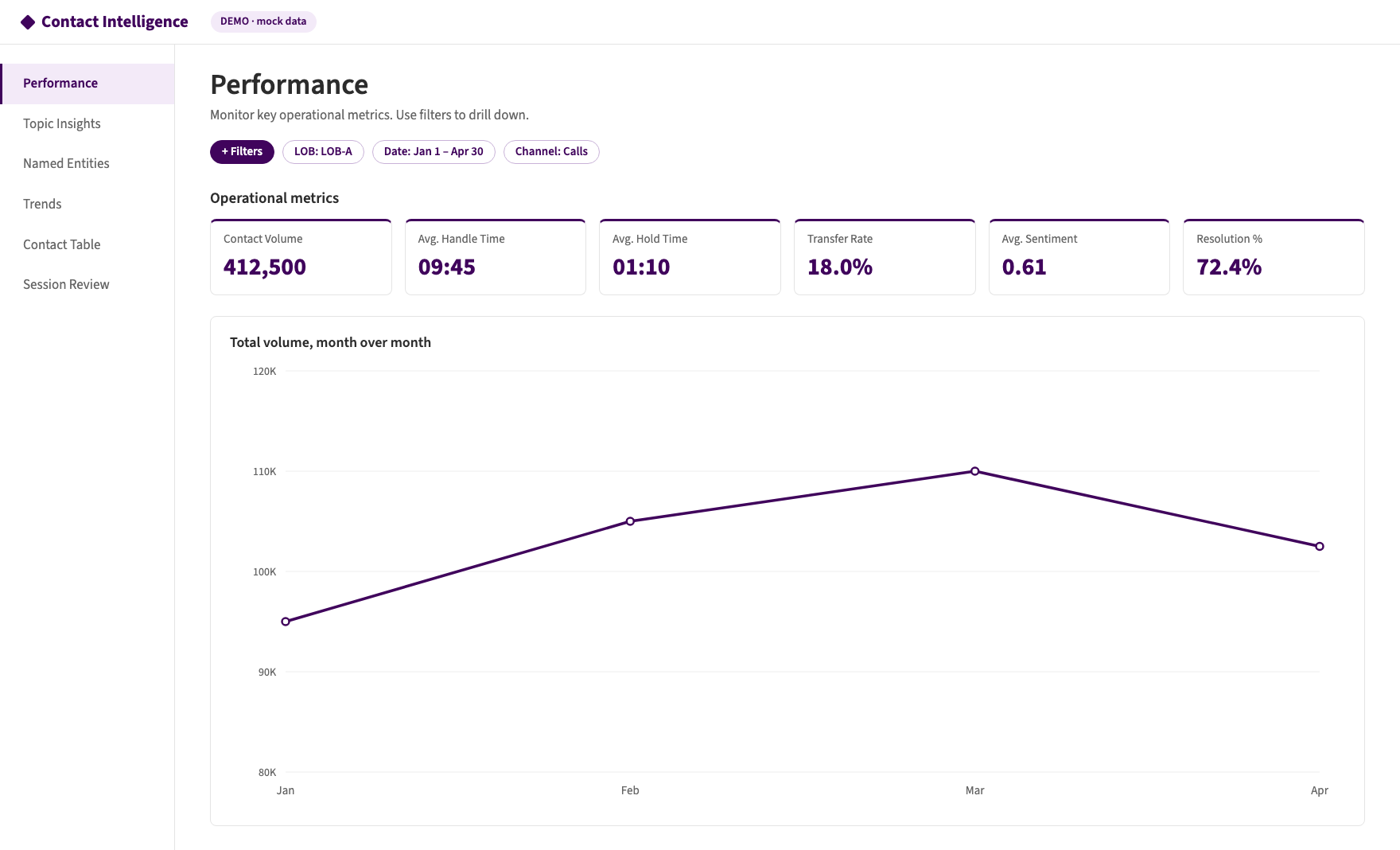 Figure 4: Performance view, filtered to one line of business (mock data).
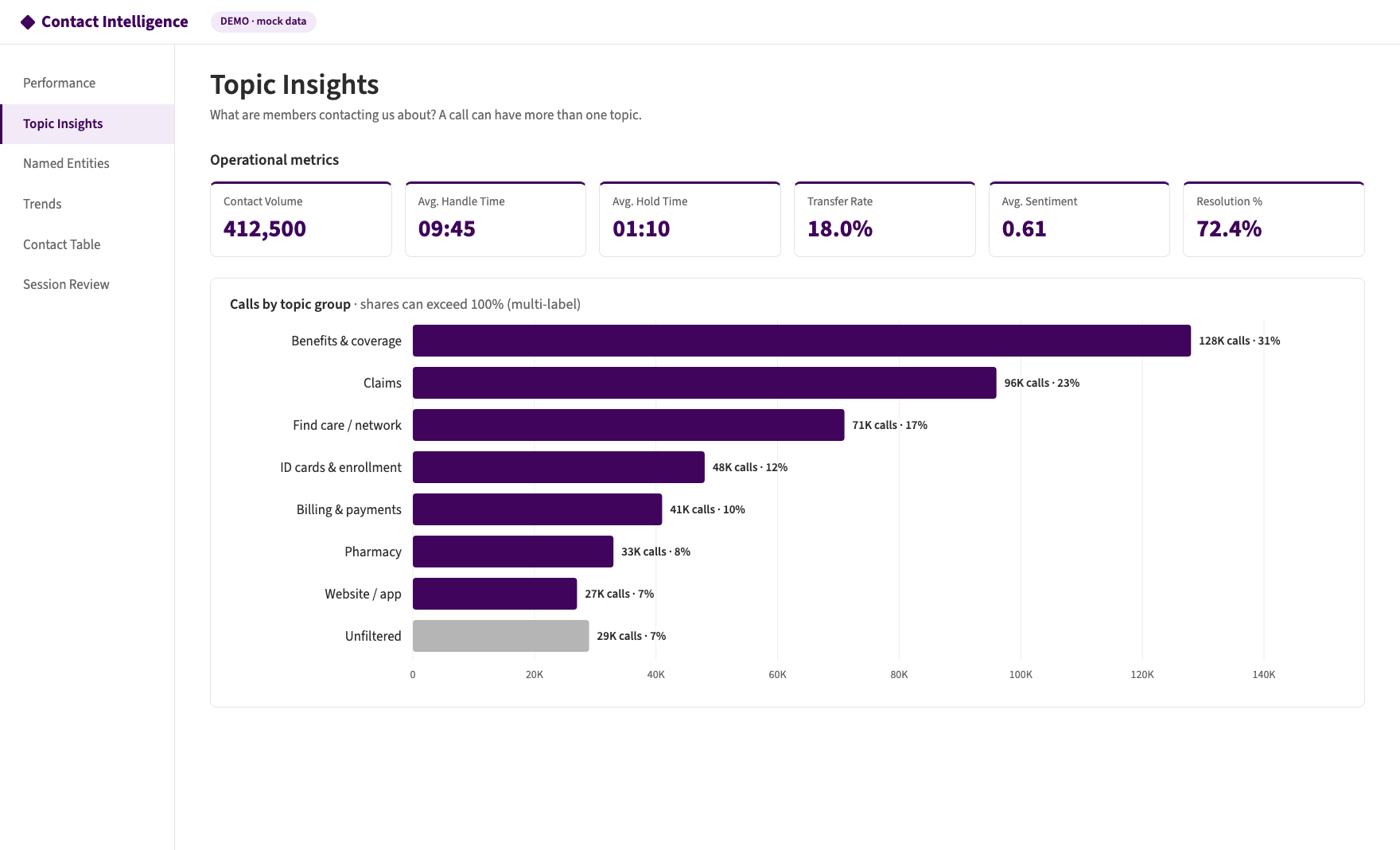 Figure 5: Topic Insights. Shares can exceed 100% because a call can have several topics (mock data).
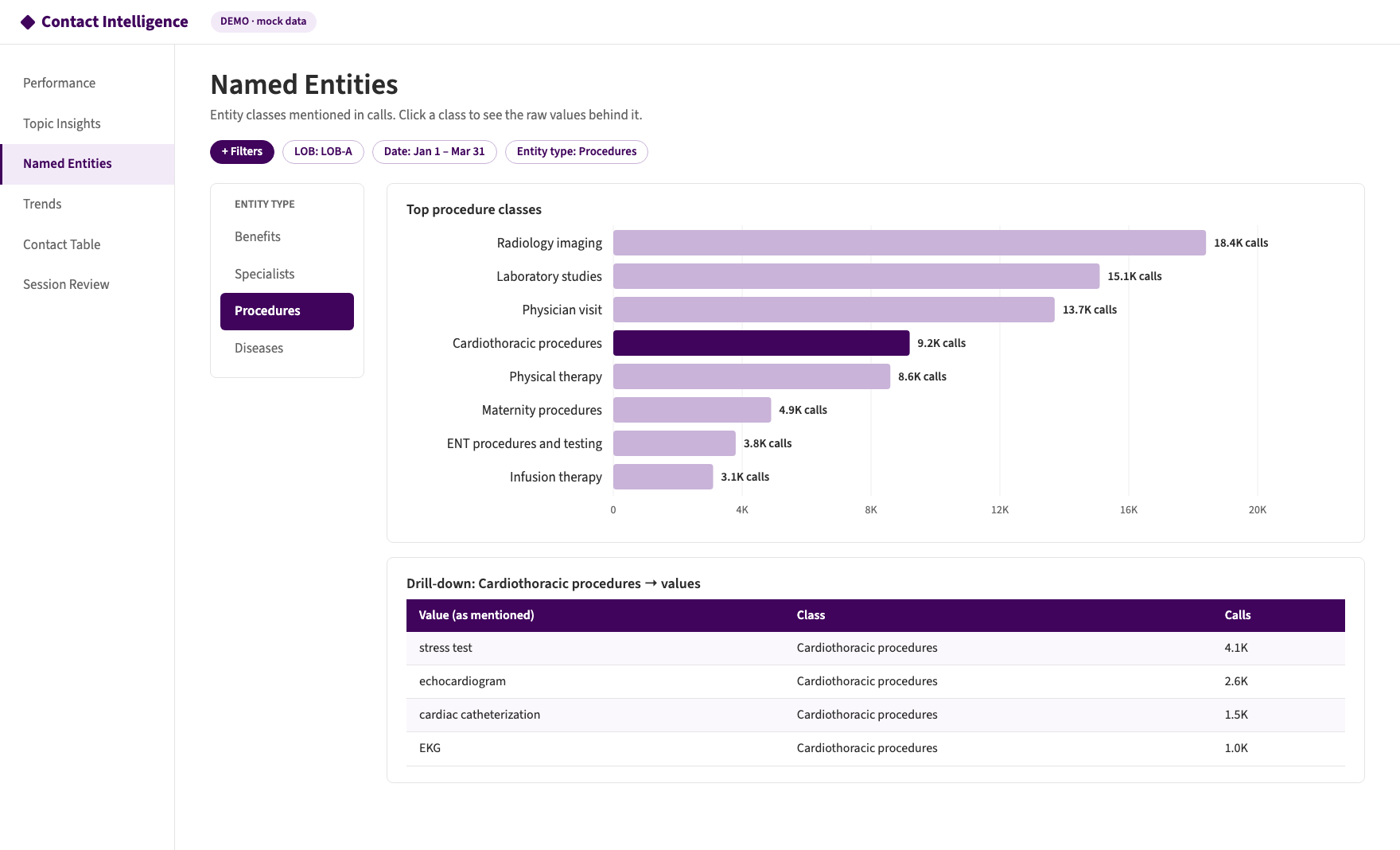 Figure 6: Named Entities, with drill-down from a class to the values behind it (mock data).
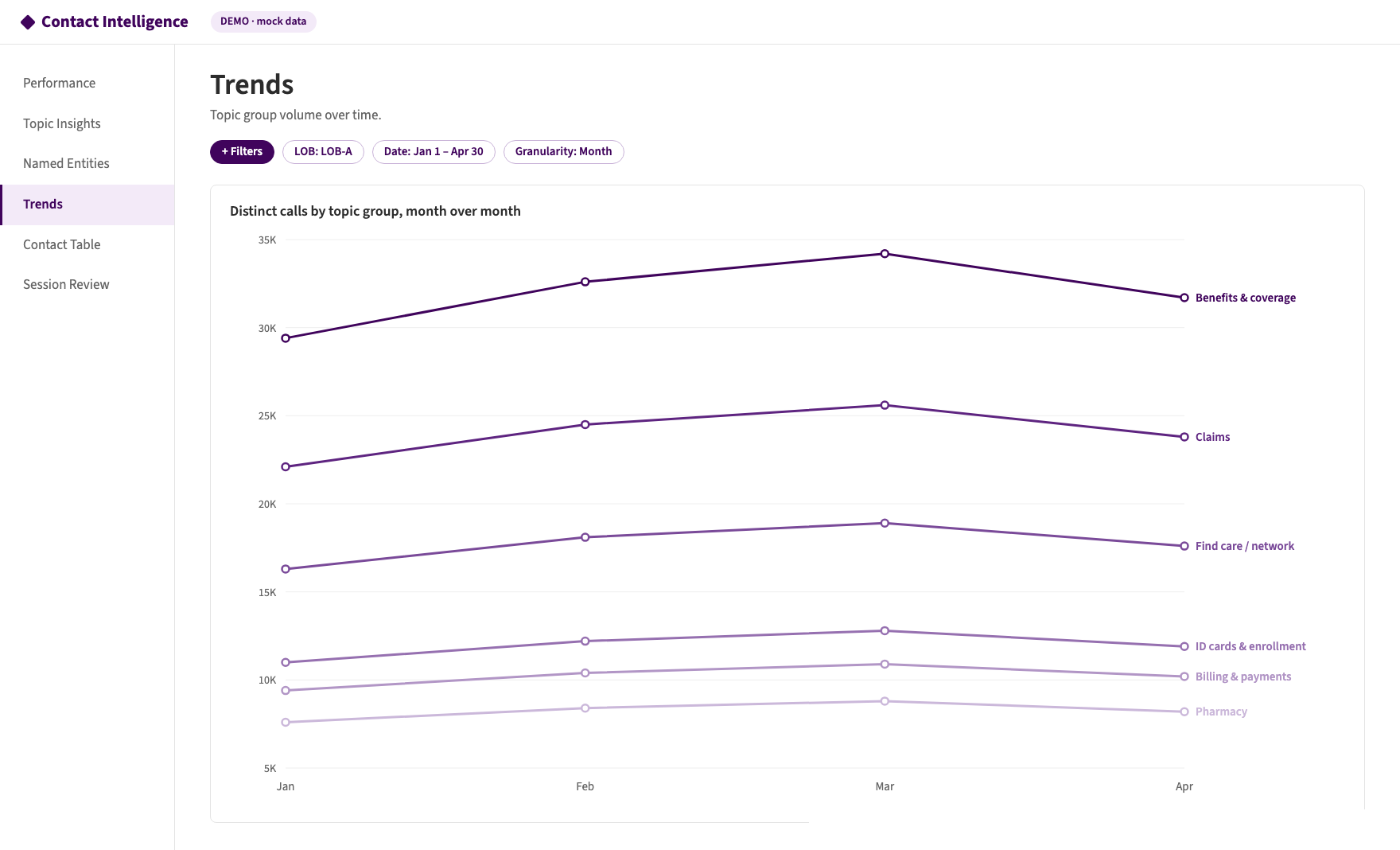 Figure 7: Topic group trends month over month (mock data).
Lessons learned
- Summarize first. At 300 million calls a year, one clean summary per call makes every downstream model cheaper and more accurate.
- Use the simplest tool for each layer. An LLM where language is messy, a fine-tuned classifier for high-volume topics, a dictionary for fixed categories, SQL for everything already structured.
- Constrain every output. Response schemas, fixed taxonomies and mapping tables. Free text can’t be counted.
- Make every job rerunnable. Process one
call_dateat a time and overwrite that partition, so a failed day is just a rerun. - Consolidate before you visualize. Build one partitioned, clustered table after all jobs finish. Queries stay fast and never show half-loaded data.
- Design for multi-label. Calls cover several topics and many entities, so count distinct calls.
- Keep
call_ideverywhere. Every output must join back to its source call. - Protect sensitive data. Encrypt summaries, de-identify member IDs, and restrict access to transcripts and health entities.
- Make results auditable. A single-call review screen lets people check AI output against the original conversation.